AI-powered search for Shopify stores: Compare app options

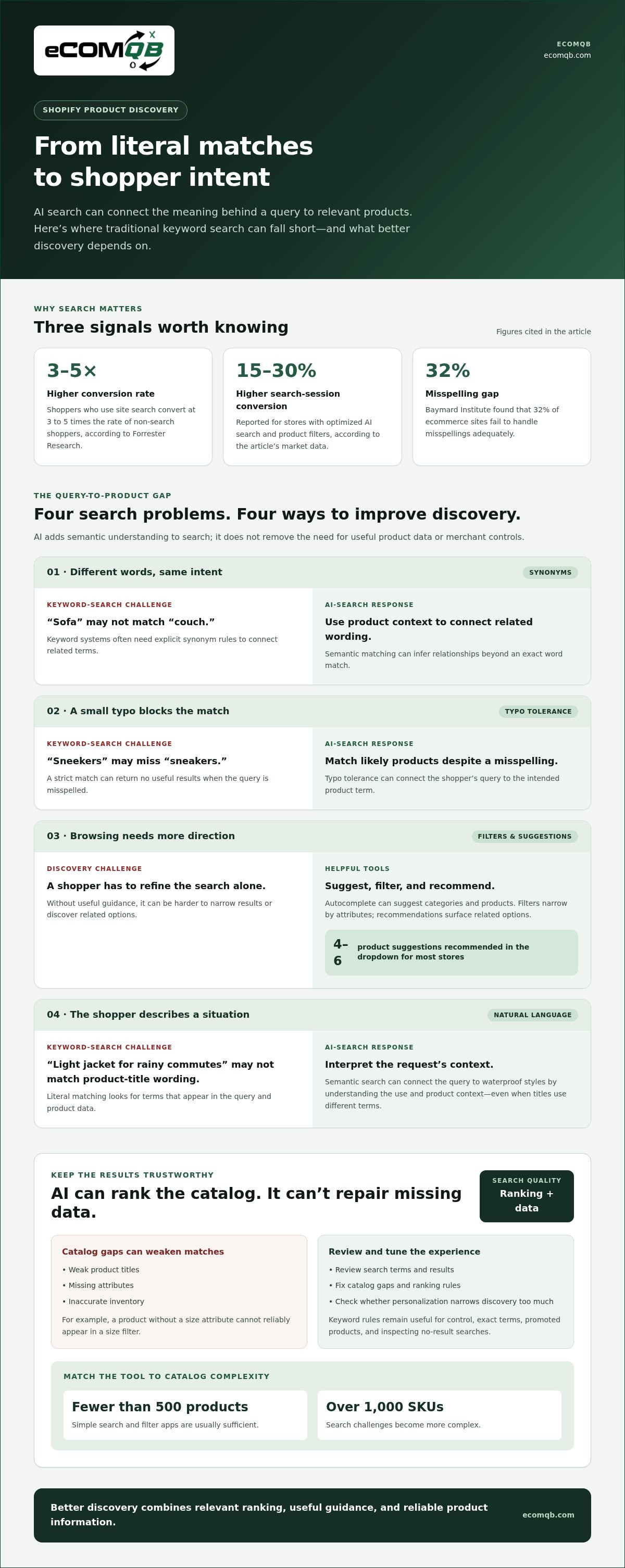
Search is a revenue lever, not just a site utility. AI-powered search for Shopify stores can sharpen relevance ranking, personalize results, and suggest useful queries through autocomplete. Forrester Research reports that shoppers who use site search convert at 3 to 5 times the rate of non-search shoppers.
A basic search bar can frustrate shoppers when it misses intent, ranks products poorly, or offers little help as they type. The right app can make product discovery faster and more intuitive, but features and fit vary by store.
This guide explains what AI adds to Shopify search and compares app options for relevance ranking, personalization, and autocomplete. You’ll see how these approaches differ, what each feature changes in the shopping experience, and how to choose an option that fits your catalog and growth priorities.
Key Takeaways
- Assess search by how well it understands shopper intent, ranks relevant products, and helps people refine queries as they type.
- Compare AI search with keyword-based search to see where semantic understanding can improve product discovery.
- Evaluate personalization and relevance controls against your catalog structure and the shopping experience you want to create.
- Use the app comparison to narrow options by core capabilities, then weigh each app’s pricing model against your store’s needs.
- Choose a solution that fits your current search challenges and gives you a clear path to optimize discovery over time.
What Does AI-Powered Search Actually Add?
AI-powered search for Shopify stores can connect a shopper’s intent with products, not just matching words. A query such as “light jacket for rainy commutes” can point toward waterproof styles even when product titles use different terms. Forrester Research reports that shoppers who use site search convert at 3 to 5 times the rate of non-search shoppers, making discovery a performance lever.
AI search apps can improve Shopify product discovery by interpreting broader queries, surfacing relevant matches, and offering autocomplete suggestions. Stores with optimized AI search and product filters see 15-30% higher conversion rates on search-driven sessions, according to the market data in this brief.
That lift depends on the full discovery path. Search ranking, filters, product recommendations, and clear product information should work together. A shopper searching “gift for a new baker,” for example, may need category suggestions, useful filters, and products ranked by fit, not an exact keyword match. Simple search and filter apps are usually sufficient for stores with fewer than 500 products; stores with over 1,000 SKUs face more complex search challenges.
Useful product-discovery features include:
- Autocomplete: Suggest categories and products as shoppers type. The recommended dropdown for most stores shows four to six product suggestions.
- Typo tolerance: Match misspelled queries to likely products. Baymard Institute found that 32% of ecommerce sites fail to handle misspellings adequately.
- Filters and recommendations: Help shoppers narrow browsing by attributes, then discover related options without restarting their search.
Store search is only one discovery channel. Perplexity shopping can help people compare products while researching across the web, while an onsite search app guides browsing within a Shopify storefront. For merchants looking to expand their visibility across external search and generative engines, consulting a specialized SEO agency Dubai such as Right-Door can help optimize product structured data for web-wide discovery. AI agents can also answer questions about products or store policies using information curated from a store’s catalog and settings.
AI search has limits. Weak product titles, missing attributes, or inaccurate inventory can lead to poor matches, even with machine learning. Personalization can also overemphasize past behavior, narrowing discovery when shoppers want something new. Review search terms and results, then fix catalog gaps and ranking rules.
| Discovery option | Relevance | Personalization | Autocomplete | Best fit |
|---|---|---|---|---|
| Native Shopify search | Keyword and catalog matching | Limited | Basic assistance | Smaller, simpler catalogs |
| AI search app | Intent-aware ranking | App-dependent | Often configurable | Complex onsite discovery |
| Product filters and recommendations | Attribute-led refinement | Can use shopper signals | Not the main function | Guided browsing |
| Perplexity shopping | Comparison across products | Research-context driven | Not onsite autocomplete | External product research |
Match your main discovery gap to the feature that can address it, then assess what catalog work is needed to keep results accurate.
How AI-powered search differs from traditional keyword search
Traditional keyword search looks for terms that appear in a query and product data. If a shopper types “blue running shoes,” it prioritizes listings with those words. AI search adds semantic understanding: it can interpret related language and product context, so “navy trainers for jogging” can surface similar matches. The difference is intent, not just vocabulary.
That shift changes how merchants manage search. Keyword systems often rely on product titles, tags, and explicit synonym rules. AI systems can use product attributes and query patterns to infer relationships. For example, a search for “premium leather work bag” can connect “premium” with higher-end positioning and “work bag” with suitable product categories, when catalog details support those signals.
Shopify AI search tools handle synonyms, typos, filters, and natural-language queries through a mix of configured rules and semantic matching. A search for “sneekers” can account for a typo, while “shoes for a wedding” can connect intent to formal styles. Filters then narrow matches by available attributes, such as color, size, or material.
Keyword search remains predictable and easy to control. Merchants can tune exact terms, promote a specific product, and inspect phrases that return no matches. AI ranking adds another layer by interpreting query meaning and weighing product relevance. Neither approach fixes incomplete catalog data: a product without a size attribute cannot reliably appear in a size filter.
Compare the mechanics across four common query types:
- Synonyms: Keyword search needs mapped terms, such as “sofa” and “couch.” Semantic matching can connect related wording through product context.
- Typos: Typo tolerance connects “sneekers” with “sneakers,” rather than requiring an exact spelling.
- Filters: Both approaches can apply attributes, but accurate product data determines whether color or size filters work.
- Natural language: AI can interpret “light jacket for rainy commutes” as a request involving weight, weather, and use.
Use analytics to test the difference rather than relying on assumptions. Review Shopify search terms, no-result queries, and clicks on product matches. Then compare a keyword query with a natural-language version, such as “black dress” and “black dress for an evening event.” Check whether the second query returns relevant products without burying exact matches.
Choose based on control and complexity. Exact keyword rules suit tightly defined catalogs or deliberate merchandising. Semantic ranking helps when shoppers describe needs differently from product titles. If search logic and storefront experience need to align, plan your search and storefront strategy around real customer queries.
Machine learning, relevance ranking, and personalization
Machine learning can help a search system adjust product order using catalog details and shopper behavior. Relevance ranking then weighs how closely each item matches a query. For “ceramic mug for espresso,” a system might prioritize espresso-sized ceramic products even when the exact phrase does not appear in the title.
Ranking can combine several signals: wording in product titles, descriptions, and attributes; query relevance; and engagement with results. Merchants can also set business rules, such as promoting a seasonal item or ranking unavailable products lower. A strong setup balances shopper intent with deliberate merchandising instead of letting one signal dominate.
AI search apps can process catalog data, typed queries, and interactions such as product clicks or filter choices. They use these signals to match queries, adjust ranking, and personalize search. The signals available depend on the app’s configuration.
Personalization changes which relevant results appear first for different shoppers. If someone repeatedly browses minimalist homeware, a system may give similar products more visibility on a later broad search. That can speed up discovery, but over-personalization may narrow the selection. Preserve useful variety, especially for broad queries with several valid interpretations.
Catalog quality sets the ceiling. Shopify recommends clear, concise product titles, prominent price and availability, and detailed product specifications. It also recommends product attributes and structured data that AI systems can crawl. For a jacket, consistent details about material, fit, and weather use give ranking models stronger evidence than a title alone.
Use a controlled review to improve relevance:
- Inspect query intent: Group terms such as “office chair” and “chair for back support,” then compare the products each query surfaces.
- Check ranking logic: Confirm relevant products lead, while unavailable or weak matches don’t crowd the first results.
- Review personalization: Compare results for a returning shopper with a fresh session, then look for excessive repetition.
- Improve product data: Add missing attributes and precise descriptions where a relevant item ranks poorly.
Shopify search analytics can reveal queries that return no products and terms that attract clicks without meaningful engagement. Use these patterns to identify catalog gaps, missing synonyms, or ranking rules that need adjustment. Then test a revised query and inspect the results before changing broader settings.
The goal is not simply to make algorithms smarter. It’s to surface relevant results, support confident browsing, and help shoppers convert without hiding alternatives. Treat relevance and personalization as measurable parts of the search experience, and refine them using real queries and product data.
Shopify search app comparisons
Compare Shopify search apps by what each one does, not by an “AI” label. Evaluate query understanding, typo tolerance, synonym controls, instant results, filters, analytics, and merchandising. Two apps may both claim intelligent search yet differ sharply in how merchants configure ranking and review search behavior.
Support for Shopify Markets, multiple languages, and currencies depends on how the app integrates with localized storefront content and market settings. Search results should reflect the shopper’s language and show prices in the currency used by the active market.
Use these ten approaches as comparison categories. They describe search capabilities, not specific app brands or guaranteed features.
| Option | Query handling | Personalization | Best use |
|---|---|---|---|
| Shopify native search | Keyword-based | Basic | Simple catalogs |
| Semantic search | Intent and related terms | App-dependent | Natural-language queries |
| Typo-tolerant search | Misspellings | Limited | Frequent spelling variations |
| Synonym-led search | Merchant-mapped terms | Limited | Category vocabulary gaps |
| Autocomplete search | Instant suggestions | Query-led | Faster query entry |
| Faceted search | Attribute filters | None required | Detailed product ranges |
| Personalized ranking | Query plus shopper signals | Core feature | Returning shoppers |
| Merchandising-led search | Rules and boosts | Optional | Campaign priorities |
| Visual search | Image-based discovery | App-dependent | Image-led categories |
| Conversational search | Full questions | Context-led | Complex product needs |
Test how each option handles the same queries. Include a synonym, a typo, a natural-language request, and a filtered search. For example, try “trainers,” “sneekers,” and “shoes for wet weather,” then compare relevance and available refinements. This shows whether the app understands language or relies mainly on manually maintained rules.
Next, check analytics and controls. Can merchants identify no-result queries, tune synonyms, and adjust product boosts? Can they distinguish a relevant result from a promoted one? Clear controls matter: a rich feature set adds little if the team cannot diagnose poor matches or maintain product attributes.
Choose the approach that addresses your biggest search gap first. Prioritize semantic matching for varied query language, typo tolerance for misspellings, and filters for catalogs with meaningful attributes. Then compare setup effort, localized storefront behavior, ranking control, and analytics before choosing an app.
Shopify recommends including information comparing similar products on product detail pages for AI systems to crawl. Clear product distinctions can also help shoppers evaluate results and choose confidently.
That clarity matters: Around 60% of U.S. shoppers will stop buying from a company after multiple negative experiences, and 17% of U.S. shoppers may stop buying from a company after one negative experience. Reliable search and useful product comparisons can reduce friction as shoppers weigh alternatives.
How much do Shopify AI search apps cost?
Shopify AI search app costs depend on the pricing model and included features. App plans may be based on catalog size, search activity, storefront needs, or access to advanced controls. Compare the billing basis with your store’s actual search demand before choosing a plan.
Start by mapping the features your team will use. A store that needs typo tolerance and synonym management has different requirements from one seeking personalized ranking, merchandising rules, and detailed analytics. Paying for tools that don’t address your main search bottleneck adds complexity without improving the customer journey.
Check how each app defines its usage limits. Search volume can change with promotions and seasonal demand, while catalog size shifts as products are added or removed. If billing depends on usage, estimate typical activity and peak periods using your store’s analytics. If it depends on catalog scale, include variants and product updates in your review.
Separate subscription charges from implementation effort. Your team may need to improve product attributes, build synonym lists, tune ranking rules, and test results. These tasks take internal time even when app setup is straightforward. For a store with inconsistent product data, catalog cleanup may be the larger operational investment.
Use this comparison checklist before selecting a plan:
- Billing basis: Identify whether the plan changes with search activity, catalog size, features, or storefront configuration.
- Included capabilities: Match the plan’s ranking, autocomplete, personalization, filtering, and analytics tools to your priorities.
- Usage boundaries: Review how the app handles demand spikes and what happens when the store reaches a plan limit.
- Operational workload: Account for the time needed to maintain product data, synonyms, and merchandising settings.
- Performance review: Decide which search terms, result clicks, and conversions will show whether the app earns its place.
Compare options on a like-for-like basis. A lower subscription may omit controls your team needs, while a feature-rich plan may require more setup and ongoing management. For example, a focused catalog with stable product attributes may need fewer ranking adjustments than a broad catalog with changing inventory and diverse shopper language.
Set a review point after launch. Compare search queries, no-result terms, and product engagement against your starting performance. Keep the app only when the added capabilities support a clear improvement in discovery or reduce a measurable search friction. For storefront decisions tied to search performance, discuss your Shopify search strategy.
EComQB: Revenue Generating AI Tools
eComQB helps eCommerce brands connect AI decisions to broader growth priorities through Revenue Generating AI Tools and AI transformation for eCommerce Brands. If search improvements need to align with customer experience, marketing, and storefront strategy, this is a practical next step beyond selecting an app.
Turn to eComQB when you’re assessing where AI fits across your growth system, not just how a search tool ranks products. Its curated AI technology stacks support eCommerce growth, alongside services such as Agentic Media Buying and Meta Advertising Execution. The right focus depends on the challenge your business is solving.
Contact eComQB or visit ecomqb.com to discuss your eCommerce growth priorities.
Turn Search Insights Into Your Next Growth Move
Your next search decision should connect customer intent with the wider growth system. Treat AI-powered search for Shopify stores as part of how shoppers discover, evaluate, and choose products, not as an isolated feature. Set a clear objective, identify the search friction you want to address, and use that objective to guide implementation and ongoing refinement.
eComQB brings Revenue Generating AI Tools and AI transformation for eCommerce Brands to growth challenges that call for a coordinated strategy. Agentic Media Buying can also support brands aligning customer acquisition with their broader eCommerce direction. The focus is practical: connect the right technology and execution to the business priority in front of you.
Choose a deliberate next step. If you’re ready to explore how search fits your growth priorities, contact eComQB about your search. Build the experience with clarity, then keep improving it as your customers’ needs evolve.
Frequently Asked Questions
What Is AI Search for Shopify?
AI search for Shopify helps shoppers find products beyond exact keyword matches. It can interpret related wording, accommodate misspellings, and use catalog information to rank results. For example, a shopper searching “gift for a cyclist” may see products connected to cycling even if those words aren’t in every title. Results still depend on accurate, consistent product information.
What is AI site search?
AI site search uses machine learning or language-processing techniques to interpret queries and return relevant content. On an eCommerce site, that content may include products, categories, or help information, depending on how search is configured. A shopper asking about a product’s material could be guided to relevant catalog details rather than only pages containing the exact phrase.
Will installing a third-party search app slow down my store?
A third-party search app can affect storefront performance depending on how it loads scripts, retrieves results, and integrates with your theme. Check key pages before and after installation, including a collection page and a product page. Test search on mobile as well as desktop. If loading slows or results are delayed, review the app’s theme integration and remove scripts or features your store doesn’t use.
What is AI-powered search for Shopify stores?
AI-powered search for Shopify stores uses signals beyond exact text matches to help shoppers find products. It can connect a query to product attributes and related concepts, then rank likely matches. For example, a search for “compact travel bag” can surface products described as small carry-ons. Accurate catalog information, clear attributes, and thoughtful search settings help merchants improve results.
What are the best AI search apps for Shopify in 2026?
The best app for your store depends on its search challenge, catalog, and operating needs. A merchant focused on misspellings should prioritize typo handling; a store with complex product attributes may need stronger filtering and ranking controls. Compare app capabilities against real store queries, then assess analytics, merchandising controls, localization support, and setup requirements. Test your shortlist using actual catalog searches before choosing.
What features should you compare in Shopify AI search tools?
Compare query understanding, synonym controls, typo tolerance, autocomplete, filters, personalization, ranking rules, and search analytics. Also review how each tool handles product variants, unavailable items, and localized storefront content. For a practical assessment, create a test set with a misspelled query, a synonym, a broad product need, and a specific attribute request. Check the accuracy of the results and whether your team can adjust them.
How do you install and configure AI-powered search on a Shopify store?
Choose an app that fits your catalog and discovery needs, then prioritize search configuration during the first week after installation. Review queries that returned no products over the previous 30 days, improve product data and ranking rules, and spend 20 minutes testing real search queries before announcing the changes to your team.