
A strong Shopify development partner is measured by four things: relevant experience, work quality, credible client feedback, and dependable post-launch support. The right partner translates your business goals into a storefront that works smoothly for customers and your team. Choose based on more than a polished portfolio or confident pitch.
The build matters, but so does the thinking behind it: how the partner handles your requirements, explains trade-offs, and plans for after launch. This guide offers a practical way to assess those factors before you commit.
You’ll learn what to look for in past projects, how to assess a Shopify build, which client feedback carries weight, and what ongoing support should cover. You’ll also see how eComQB’s Shopify design and development connects with a broader eCommerce growth strategy, helping you decide what to do next.
Key Takeaways
- Ask prospective partners how they’ll translate your business goals into a clear scope, technical plan, and launch process.
- Assess portfolios for relevant project experience, evidence of results, and client feedback that speaks to the working relationship.
- Look beyond visual polish: evaluate store structure, loading performance, mobile usability, and how the build supports your customers’ journey.
- Define post-launch support before work begins, including how maintenance, bug fixes, updates, and performance improvements will be handled.
What Makes a Great Shopify Development Partner?
A strong partner aligns platform decisions, integrations, and delivery with your store’s business goals. Assess the team’s expertise and process, not just its pitch.
Partner Selection and Hiring
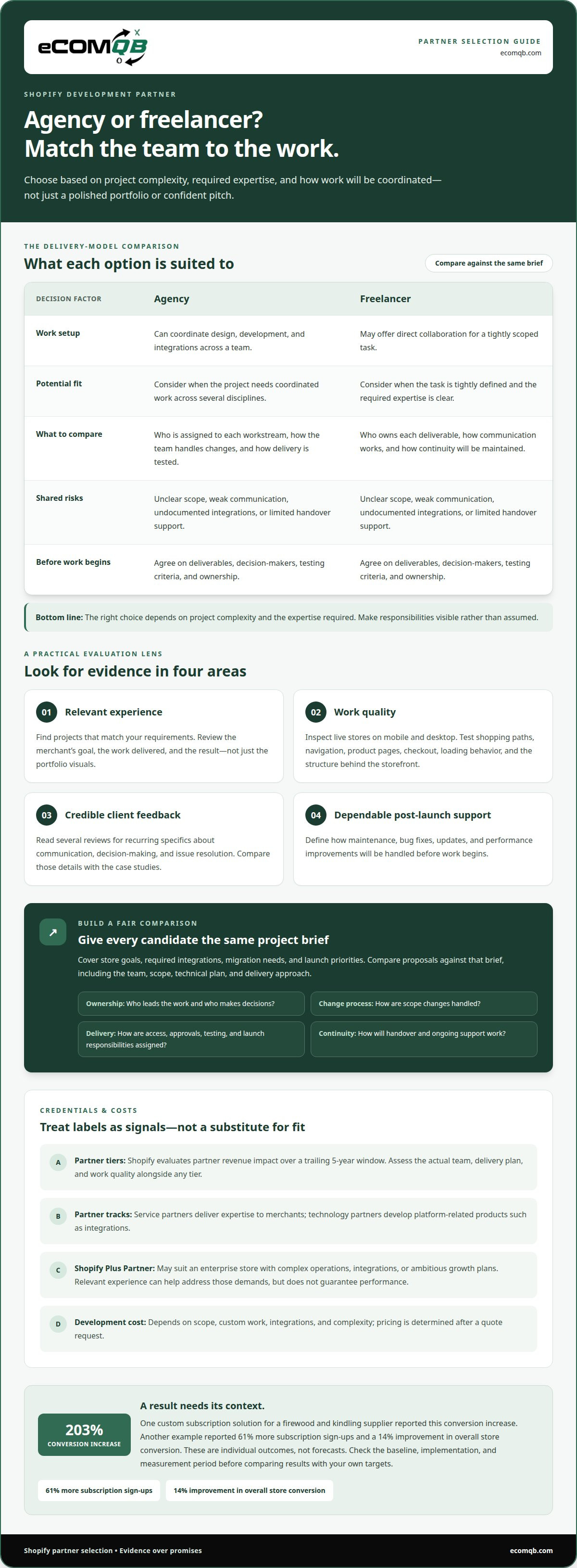
Start with a clear brief covering store goals, required integrations, migration needs, and launch priorities. Ask who will lead the work, how scope changes are handled, and what happens if an integration creates a technical obstacle. Use Shopify Partner Directory listings to explore providers’ services and experience, while distinguishing a directory profile from a certification tied to specific expertise.
To find and hire a Shopify development partner, shortlist candidates whose project experience matches your requirements, then compare proposals against the same brief. Shopify development cost depends on scope, custom work, integrations, and complexity; pricing is determined after a quote request.
Partner Benefits and Qualifications
A Shopify Plus Partner may suit an enterprise store with complex operations, integrations, or ambitious growth plans. Relevant experience can help address those demands, but it does not guarantee performance. Ask for examples that match your store and how the proposed approach supports your priorities.
Shopify evaluates partner revenue impact over a trailing 5-year window. Treat partner tiers as one signal, then assess the actual team, delivery plan, and work quality. Shopify has service and technology partner tracks: service partners deliver expertise to merchants, while technology partners develop platform-related products such as integrations.
Onboarding and Project Process
Onboarding should turn your brief into an agreed scope, assigned responsibilities, and a working project plan. Ask what decisions your team must make, how progress is shared, and how changes affect delivery. For example, assign clear owners for product-data migration and custom integrations before implementation begins.
Before signing, clarify access, approvals, testing, and launch responsibilities. These checkpoints expose process gaps early and reduce the risk of unclear ownership, missed requirements, or a rushed handover.
Partners Versus Freelancers
An agency can coordinate design, development, and integrations across a team; a freelancer may offer direct collaboration for a tightly scoped task. The right choice depends on project complexity and the expertise required. Compare who handles each workstream and how continuity will be maintained.
Key risks include unclear scope, weak communication, undocumented integrations, and limited handover support. Reduce them by agreeing on deliverables, decision-makers, testing criteria, and ownership before work begins. A strong partner makes responsibilities visible rather than assumed.
Agency experience, portfolios, and client reviews
A portfolio shows execution; a case study reveals the business problem behind it. Review projects in your sector, then look for clear context: the merchant’s goal, the agency’s work, and the result. Shopify partners serve fashion, electronics, healthcare, beauty, food, automotive, jewelry, lifestyle, and B2B brands. Industry familiarity matters when product discovery, checkout, or catalog needs differ.
Look beyond a polished homepage. Open live stores on mobile and desktop, test key shopping paths, and inspect themes, navigation, product pages, and checkout. Ask what was custom-built, which integrations were involved, and how changes were tested. A conversion result is more useful when the case study explains the work and measurement, not just the headline.
Published examples show why context matters: one custom subscription solution for a firewood and kindling supplier increased conversion by 203%. Another reported 61% more subscription sign-ups and a 14% improvement in overall store conversion. These are individual outcomes, not forecasts. Check whether the case describes the baseline, implementation, and measurement period before comparing it with your own targets.
When comparing Shopify Plus agencies, match your project’s complexity to demonstrated experience. Enterprise stores may need coordinated work across themes, integrations, and advanced customer journeys. Compare relevant case studies, the team assigned, and each agency’s testing approach. A higher-tier label alone does not show whether its experience fits your store.
Client reviews add evidence about delivery: communication, decision-making, and issue resolution. Read several reviews for recurring specifics, then compare them with the agency’s case studies. If your next priority is aligning store development with growth goals, discuss your Shopify growth plan.
Built for Shopify quality standards
A quality Shopify store combines clear structure, fast loading, mobile responsiveness, and accurate metadata. Trained Shopify designers can build for these fundamentals, but judge the finished experience across real customer journeys. Start with a mobile product page, follow its path to checkout, and note friction at each step. Strong commerce design makes the next action clear without sacrificing useful product information.
Inspect how the platform handles your catalog, navigation, and content. For example, shoppers should be able to move from a collection to a relevant product without confusing menu layers. Ask how the team structures templates and themes, and how that structure supports future updates. Dedicated product templates can make merchandising more consistent across stores with varied product details.
Test performance rather than relying on broad claims. Review loading behavior on mobile, then test key pages with the content and integrations the store will actually use. Image-heavy homepages, embedded tools, and third-party features can affect the experience. Ask what the team measures before launch, what it changes when a page feels slow, and how it retests those changes.
Metadata and accessibility also need deliberate review. Check that product pages have descriptive titles, useful page information, and headings that organize content logically. Test navigation with a keyboard, and check whether buttons and links clearly communicate their purpose. These steps help customers use the store and search platforms interpret its content.
Quality work continues after launch. Ask how the team documents custom code, handles platform changes, and assesses whether integrations still serve the store’s needs. Ongoing optimization can address new content, changing customer behavior, and technical updates. A practical handover includes clear documentation, defined ownership, and a way to prioritize fixes without disrupting daily commerce.
Post-launch maintenance and technical support
Launch starts live operations; it does not end the build. Shopify development partners commonly provide maintenance, bug fixes, performance optimization, updates, security checks, and technical support. For eCommerce brands, these services help keep a store functional as products, campaigns, and customer needs change. Define which tasks continue after handover, who owns them, and how work is prioritized.
Make the support scope concrete. Ask how the team handles checkout issues, broken integrations, or updates that affect a theme. Clarify how requests are submitted, how urgent problems are triaged, and who communicates progress. Specific answers show whether the support model fits your operations, without relying on vague promises of ongoing care.
Set a practical process for reviewing store performance. The team can examine key customer journeys, from product discovery to cart and checkout, and identify friction that may affect conversion. Ask what evidence supports each recommendation, how changes are tested, and how results are documented. A clear record helps your team distinguish useful improvements from untested changes.
Ownership matters, too. Confirm who controls store access, theme files, integration settings, and technical documentation after launch. For example, a new team member should be able to understand what a custom storefront feature does and where its settings live. If a proposal cites certified specialists, ask what roles they will have in maintenance and issue resolution.
Before choosing development partners, compare support scope alongside build scope. A useful plan names the work covered, the communication path, and how ongoing optimization fits your priorities. If your store needs coordinated design and development beyond launch, discuss your Shopify support needs and map the next phase.
EComQB: Revenue Generating AI Tools
eComQB helps eCommerce brands connect storefront decisions with growth priorities through Revenue Generating AI Tools and AI transformation. After your Shopify store is built, these services can support the next stage by aligning technology and marketing activity with your business objectives.
If paid acquisition is your priority, Agentic Media Buying and Meta Advertising Execution may be relevant. If you’re considering how AI could support broader eCommerce operations, AI transformation offers a way to explore that direction. Choose a starting point based on the challenge, whether it’s marketing execution or applying AI across your business.
Contact eComQB to discuss the direction that best fits your growth priorities.
Set Your Store’s Next Growth Move
Choosing a Shopify development partner should be about the operating change your store needs next, not simply a list of features to launch. Name the outcome that matters most to your team, then use it to set priorities, ownership, and the sequence of work. This keeps the next phase aligned with business direction rather than a series of disconnected upgrades.
Your next move may extend beyond the storefront itself. Consider how customer experience, marketing execution, and internal workflows should reinforce one another as your business evolves. eComQB can join that planning conversation when you’re ready to connect your store roadmap with broader growth priorities. Use the discussion to define what deserves attention now, what can wait, and how you’ll evaluate progress. Contact eComQB about your Shopify store and bring the priorities you want to tackle. A focused plan gives your team a stronger starting point for what comes next.
Frequently Asked Questions
How Often Are Shopify Partner Tiers Reviewed?
Shopify evaluates partner revenue impact over a trailing 5-year window. That window describes the period considered, not a particular review schedule. Treat tier as one data point when assessing fit. Then compare the proposed team’s relevant work, responsibilities, and technical expertise with the demands of your store.
What does a Shopify development partner do?
A Shopify development partner plans, builds, or customizes a merchant’s store around its operating needs. Work can include migrating products, customer data, purchase orders, content, and search-engine settings. Partners may also develop themes, integrate apps, adjust checkout, or create custom features. The project scope determines which capabilities matter most.
How can I verify a Shopify Partner’s experience and portfolio?
Choose a portfolio project with a similar business model or customer journey, then inspect the live store. Check whether it demonstrates the feature your project needs, such as subscription selection or a complex product catalog. Ask the agency to explain its role, the work delivered, and how it measured the reported outcome.
What services do Shopify development agencies offer?
Agency services can include store design, theme development, app integrations, checkout adjustments, and custom functionality. Some partners also support store data and content migrations. Separate build requirements from optional enhancements: for example, a store may need product-data migration before a custom product-finder experience. This makes the scope easier to assess.
What questions should I ask a Shopify development agency before hiring?
Ask which proposed features use Shopify’s existing capabilities, apps, or custom code. Clarify how the team will handle data migration and integration dependencies, and agree on testing acceptance criteria. Also ask what decisions your team must make and which deliverables you’ll receive at handover. Specific answers show how the agency turns a brief into accountable work.