How to Automate eCommerce Competitor Analysis for Better Pricing

Competitor monitoring tracks changes; competitive intelligence automation turns those signals into prioritized insights and briefings that support decisions. Automating eCommerce competitor analysis means building a wider system, not simply checking rival prices. Keep people in control of verifying claims and choosing how to respond.
It’s easy to focus on price because it’s visible and can change quickly. But a competitor’s offer also includes its products, fulfillment, customer experience, traffic, and technology. A price comparison without that context can point you toward the wrong move.
This article shows how to distinguish monitoring from intelligence, choose which competitors and signals to track, and build a practical workflow. You’ll learn how to compare rival storefronts, pricing, delivery experience, website traffic, and technology, then turn relevant changes into action. The aim is a clearer view of the market, with less manual scanning and more attention on decisions that can strengthen your position.
Key Takeaways
- Separate simple change tracking from intelligence workflows that prioritize signals and help teams decide what to do next.
- Choose alerts by business impact: route pricing changes and launches differently from routine content updates.
- Compare the full offer, including products, delivery, and customer experience, before changing your pricing strategy.
- Use traffic patterns and storefront technology as context for understanding how competitors attract and convert shoppers.
- When analysis needs to connect to growth execution, eComQB’s Revenue Generating AI Tools and AI transformation for eCommerce Brands can support the next move.
What's the difference between competitor monitoring and competitive intelligence automation?
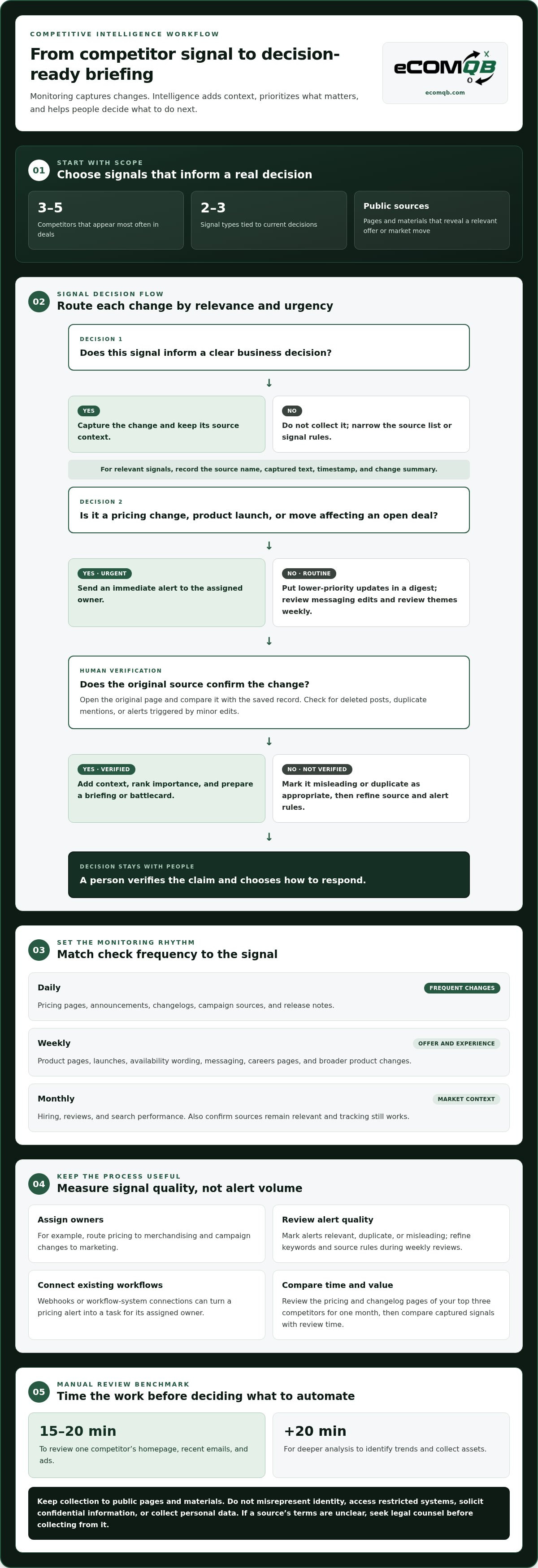
Monitoring captures changes; competitive intelligence automation ranks signals and turns them into decision-ready briefings. To track product launches, inventory, and stock availability automatically, monitor public product pages, release notes, and availability messages, then alert your team when they change.
-
Select Monitoring Sources and Check Frequencies
Choose three to five competitors that appear most often in deals, then select two or three signal types tied to current decisions. Monitor pricing pages, announcements, changelogs, and campaign sources daily; review product pages, messaging, and careers pages weekly; and check hiring, reviews, and search performance monthly. Include public emails, ads, landing pages, websites, and social posts when they reveal a relevant offer or market move. Avoid collecting signals unless they inform a clear decision.
-
Track Competitor Pricing and Website Changes
Monitor competitor pricing pages and announcements daily, recording each change, page, and date in a shared log. Track product pages for launches, availability wording, and stock changes. Check changelogs and release notes daily, and review broader product changes weekly. Compare the full offer, including bundles, promotions, and shipping messages, rather than treating the displayed price as the whole story. Alert the team when a change matters.
-
Estimate Time for Manual Monitoring
Time a manual review before deciding which tasks to automate. Reviewing one competitor’s homepage, recent emails, and ads takes 15 to 20 minutes; a deeper analysis adds another 20 minutes to identify trends and collect assets. That workload grows with every rival and source. Start with the pricing and changelog pages of your top three competitors for one month, then compare the captured signals with the time your team spent reviewing them.
- Keep collection public and turn signals into decisions. Use public pages and materials; don’t misrepresent your identity, access restricted systems, or solicit confidential information. Avoid logins, technical blocks, and personal data. If a source’s terms are unclear, seek legal counsel before collecting from it. A monitor records changes, such as a new landing page or ad. Competitive intelligence automation adds context, ranks importance, and drafts a briefing or battlecard. People still verify claims against their sources and decide what action to take. Send urgent alerts for pricing changes, launches, or moves affecting an open deal; use a digest for routine updates.
What makes the best competitor analysis tool?
Automated tools consistently capture visible changes, while manual research adds context and can catch meaning a rule misses. Use both: automate collection and alerts, then have someone verify important findings against the original source.
Build the workflow in order: choose sources, define alert rules, assign owners, and review the record. The steps below apply that sequence to blog posts, social updates, news, and brand mentions.
- Track the sources tied to active decisions. Start with competitor blogs, social accounts, campaign pages, and news mentions. Set rules for product launches, price announcements, or messaging changes instead of alerting on every new post. A blog article about a new product, for example, may warrant review, while a routine company update may not. A focused source list keeps the dashboard useful and makes each finding easier to assess.
- Separate immediate alerts from routine updates. Send pricing changes, new product launches, and competitive moves affecting an open deal as immediate alerts. Put lower-priority blog and social posts in a daily digest, then review messaging edits and review themes weekly. Assign an owner to each alert type, such as merchandising for pricing and marketing for campaign changes. Clear ownership prevents important signals from sitting unread in a shared inbox.
- Preserve source history and validate each finding. Store the source name, captured text, timestamp, and change summary alongside every alert. If a competitor post appears to announce a launch, open the original page and compare its current content with the saved record. This helps catch deleted posts, duplicate mentions, and alerts triggered by minor edits. Review each source monthly to confirm tracking still works and the page remains relevant.
- Connect alerts to the tools your team already uses. Choose a platform that can send webhooks or connect alerts to the team’s existing workflow system. For example, a pricing alert can create a task for the assigned owner, while a competitor campaign mention can enter a marketing dashboard. Test each connection with a sample change, then check that the notification includes the source and action needed. AI tools save go-to-market professionals an average of 12 hours per week on manual research, so spend the recovered time interpreting signals.
- Measure accuracy by actionability, not alert volume. Review a batch of alerts and mark each as relevant, duplicate, or misleading. Tighten the keywords and source rules when a competitor brand mention captures unrelated companies or a blog alert misses a meaningful launch. Track which alerts lead to decisions, then refine the rules during weekly reviews. If your team needs to align monitoring with campaigns and storefront decisions, map the workflow to your growth priorities.
Comparing products, pricing, fulfillment and customer experience
Product and price monitoring tools track catalog, assortment, and price changes across competitor stores. Web-change monitors flag page edits, while market intelligence platforms combine those signals with broader context. Use these categories to shortlist tools, then test whether each captures the products and updates that shape your decisions.
In the US, tool costs depend on factors such as the number of products and sources monitored, update frequency, integrations, and analysis features. Compare free plans by their tracking limits and alert options, then assess whether those limits fit your workflow before choosing a paid tier.
- Match products before comparing prices. Select equivalent items using attributes such as model, size, material, bundle contents, and included accessories. A lower price for a smaller package is not a like-for-like comparison. Track assortment changes too: a new variant, discontinued item, or missing size can change how a competitor serves the same keyword audience. Use a product identifier where available, then flag mismatches for manual review.
- Capture the full price and offer. Record the displayed price alongside promotions, bundles, discounts, and shipping thresholds. A competitor’s headline price may depend on a coupon or membership condition. Capture changes on both the product page and checkout path, then compare the effective offer using consistent assumptions. An AI agent can flag unusual movements, but a person should confirm the terms before changing your own price.
- Compare fulfillment and customer experience. Review shipping options, delivery estimates, return information, and checkout steps for the same destination. Consumer surveys cited in market research found 66% of e-commerce buyers chose a brand over a competitor because its delivery services were more appealing. Treat delivery as part of the offer, not a separate operational detail. Record friction points, such as unclear shipping costs or a confusing return policy.
- Choose a tool based on coverage and workflow. A price tracker may suit focused pricing decisions; assortment monitoring adds catalog breadth, while an intelligence platform connects product updates with traffic and campaign signals. Compare source coverage, refresh frequency, exports, and alert controls. Free plans can help test a narrow keyword or product set, but make sure their limits support the workflow you intend to run.
- Turn comparisons into a repeatable decision. Save the product match, captured offer, date, and relevant source for each finding. Review changes together instead of reacting to every alert in isolation. For example, a price increase paired with reduced assortment may signal a different opportunity than a temporary discount. Use that context to decide whether to adjust pricing, merchandising, or customer messaging.
Product and price monitoring tools track changes to competitor catalogs, assortments, and prices. Web-change monitors flag page edits, while market intelligence platforms combine those signals with broader context.
Competitor analysis versus ongoing competitive intelligence
A competitor analysis captures a point-in-time view; competitive intelligence runs continuously, filtering signals and delivering them to the people who can act. Build a workflow that connects market research to decisions, not just a report archive.
-
Distinguish Analysis from Ongoing Intelligence
First decide whether your team needs a snapshot or a continuous decision engine. A competitor analysis can compare current pricing, messaging, and assortment to inform a planning decision. Ongoing intelligence collects new signals, ranks their importance, and routes relevant updates to the people responsible for action. For example, use a quarterly win-loss review to assess outcomes while tracking messaging edits, hiring patterns, and review themes weekly.
-
Build a Competitive Intelligence Database
Create a shared record with one entry per signal. Include the competitor, source, capture date, signal type, summary, evidence, owner, and resulting action. Keep the original public source beside any AI-generated summary, so analysts can trace a finding back to its evidence. Track changes over time: a discovery set that grows from 30 to 45 matches across six months may reflect a shifting market, not just better collection.
- Connect intelligence to CRM and team workflows. Map each signal to the team that can respond, then connect the database to your CRM or project workflow. A price change affecting an active opportunity could create a sales task; a messaging shift could notify marketing. Include the source, summary, and next action in each handoff. Review ownership weekly so updates don’t stall between teams or become detached from the decisions they support.
- Choose a platform or API infrastructure for your scale. A competitive intelligence platform can readily track 20 competitors. Monitoring 2,000 competitors across market segments may call for API infrastructure. Choose based on the number of sources, segments, and workflows you must support. A platform can suit teams needing an established interface; APIs allow more custom data flows but require technical implementation and maintenance. Keep the same source history and review rules in either setup.
- Use AI agents to accelerate, not replace, analysis. AI can monitor sources, summarize changes, rank signals, and draft briefings or battlecards. Keep a human review step: verify claims against original sources, judge the context, and choose the response. For example, an agent can flag a competitor’s new product announcement, but the team must assess its relevance to current customers and opportunities. For organizations looking to implement and scale autonomous intelligence workflows, specialized consulting partners like Navo Inc. assist with deploying AI agents effectively. This division speeds up automation without treating a generated summary as verified intelligence.
Comparing competitor website traffic and technology
Traffic estimates and storefront technology can reveal how competitors attract visitors and support their shopping journeys. Compare patterns and visible capabilities, then connect each finding to a specific decision.
- Compare search visibility, not just estimated visits. Record the keywords competitors target, the pages appearing in Google results, and the topics those pages cover. The top Google result captures an average click-through rate of 31.7%, while fewer than 1% of digital searchers navigate to the second results page. Use those figures as context for ranking visibility, not as a forecast of a competitor’s traffic or sales. Track whether rival pages appear for the same product and category searches as yours.
- Collect traffic estimates as directional signals. Use the same analytics estimation source and time period for each domain, then compare trends rather than treating estimates as exact visitor counts. Separate likely sources, such as organic search, paid campaigns, referrals, and social. A rival gaining search visibility for product guides may be building discovery before purchase; paid traffic concentrated on product pages can suggest a different acquisition strategy. Save the source and date alongside each summary.
- Read engagement alongside acquisition. Compare the pages attracting visitors with visible engagement cues, such as content depth, product discovery paths, and calls to action. For example, a competitor may draw search traffic to a buying guide, then link readers to a product comparison. These observations don’t reveal private conversion data, but they show how the storefront connects discovery and shopping. Use the pattern to identify content gaps and test your own customer journey.
- Map the technology that shapes the storefront. Use technology-detection tools to identify visible platforms, analytics tags, advertising pixels, and review or personalization components. Confirm clues by inspecting the public storefront: test search, filters, product pages, and checkout behavior. A detected script alone doesn’t prove how a feature is configured or used. Log the technology signal, the page where it appeared, and its likely role for customers.
- Turn comparisons into focused tests. Combine traffic patterns and technology clues before choosing a response. If a competitor earns search visibility with comparison content and offers a clear product-finder experience, test a relevant landing page and measure your own engagement. Keep competitor summaries separate from your first-party analytics, then assess outcomes using your own results. Plan a traffic and storefront analysis to connect these findings with your growth priorities.
EComQB: Revenue Generating AI Tools
eComQB helps eCommerce brands turn market signals into growth execution through Revenue Generating AI Tools and AI transformation. When competitor insights point to an opportunity in paid acquisition, Agentic Media Buying and Meta Advertising Execution can support your response. The strongest fit is when your team has identified a strategic move and needs to connect it to marketing execution, rather than simply collect more competitor data. Align the response with your priorities, audience, and storefront experience. That keeps competitive intelligence focused on decisions that matter to your business.
To explore how eComQB can support your growth strategy, contact eComQB or visit ecomqb.com.
Turn Market Signals Into Your Next Move
A disciplined approach to automating eCommerce competitor analysis can do more than inform your next pricing decision. It can help your team build a sharper operating rhythm, using market signals to shape experiments, creative choices, and customer experiences. The advantage comes from consistently turning insight into action, then learning from your own results.
When the next step is connecting intelligence to growth execution, eComQB offers Revenue Generating AI Tools, AI transformation for eCommerce brands, and Agentic Media Buying. These capabilities can help translate strategic priorities into focused marketing activity, without treating every competitor move as a command to react.
Ready to align your analysis with your growth priorities? Contact eComQB to discuss your needs. Choose your next move with clarity, then build momentum around it.
Frequently Asked Questions
How do I discover who my competitors are in a market segment automatically?
Build a discovery query around product keywords, customer needs, and the market segment you serve. For a focused starting point, small businesses can review the first three or four organic results for relevant product searches. Refine the query until it returns dozens to hundreds of plausible companies, not an unmanageable list. For example, a sample automated query identified 47 companies building AI-powered sales tools that had raised Series B or later.
How long does it take to set up an automated competitor tracking program?
Setup time depends on how many sources, signal types, and destinations your workflow requires. A practical launch starts with selecting competitors, defining what counts as a meaningful change, and assigning an alert owner. Then connect each source, test sample alerts, and remove noisy rules. A small pilot can focus on pricing and product signals; broader coverage takes more work when teams need CRM connections, custom reporting, or multiple market segments.
How Often Should Competitor Websites Be Checked?
Set check frequency according to how quickly a page can affect a decision. Pricing pages, announcements, changelogs, and campaign sources merit daily checks; product tracking and messaging or careers pages suit weekly reviews. Hiring, review themes, and search performance can be assessed monthly. Use these schedules as a baseline, then pay closer attention to a page when a major launch or active pricing decision makes its changes more consequential.
What competitive benchmarking tools can elevate your store's search rankings?
Benchmarking tools don’t raise rankings by themselves; they show where to focus your SEO work. Combine keyword and search-result tracking with page-speed testing, content comparisons, and technical site audits. Google Search Console can help you assess your own search performance, while competitor tracking can reveal topics and queries where rival pages appear. Turn those findings into a prioritized content or storefront test, then measure changes in your own impressions and clicks.
What is eCommerce competitor analysis and what can be automated?
eCommerce competitor analysis compares rival offers and market activity to guide your decisions. Automating eCommerce competitor analysis can collect public changes to product listings, prices, ads, emails, and website pages. It can also organize findings, identify changes against a baseline, and prepare summaries for review. For instance, a team can route a competitor’s new product announcement to merchandising while keeping routine content updates in a separate report.
How to automate competitor price tracking across Amazon, Shopify, and retail websites?
Start with public product pages across Amazon, Shopify storefronts, and retail sites. Match comparable items using product identifiers and attributes, then record the displayed price, promotion, availability, and observation time. Store each source with its record so the team can review changes in context. Keep collection within public sources, avoid logins or technical blocks, and account for differences in bundles, shipping, and discounts before comparing offers.
How to automate competitor SEO, paid ads, and social media analysis?
Track separate public signals for each channel: search-result visibility and page topics for SEO, visible ad creative and landing pages for paid campaigns, and posts or engagement patterns for social. Organize findings by competitor and channel, then summarize changes for the relevant team. For example, compare a new ad message with its destination page and recent social posts. Have someone review the original sources before acting on automated summaries.
How often should eCommerce competitor data be collected and updated?
Collect data at the pace of the decision it supports, and update records whenever a meaningful change appears. Daily collection suits volatile pricing and campaign signals; weekly reviews can surface product and messaging patterns. Each month, confirm monitored sources still work and refresh slower-moving indicators such as hiring or review themes. Separate the capture date from the review date so teams can distinguish a new signal from an older finding they’ve just revisited.