
More custom code does not automatically mean more scale. A scalable Shopify tech stack starts with tools that fit your needs, adding custom development only when it creates a clear advantage for customers or operations. The build-or-buy decision should come down to fit, not fashion.
It’s easy to see why teams reach for another app or a bespoke feature: both can solve a real bottleneck. But every addition brings trade-offs in cost, complexity, compatibility, and ongoing support. Choose well, and your stack can adapt as the business grows. Choose without a clear reason, and it can slow the team down.
This guide offers a practical way to assess Shopify technology, decide what to buy or build, and test whether each tool supports your growth plan. Weigh integrations, maintenance, performance, and customer experience before committing, so each decision strengthens your systems instead of adding friction.
Key Takeaways
- Separate platform capacity, infrastructure resilience, and team velocity to pinpoint what is actually limiting growth.
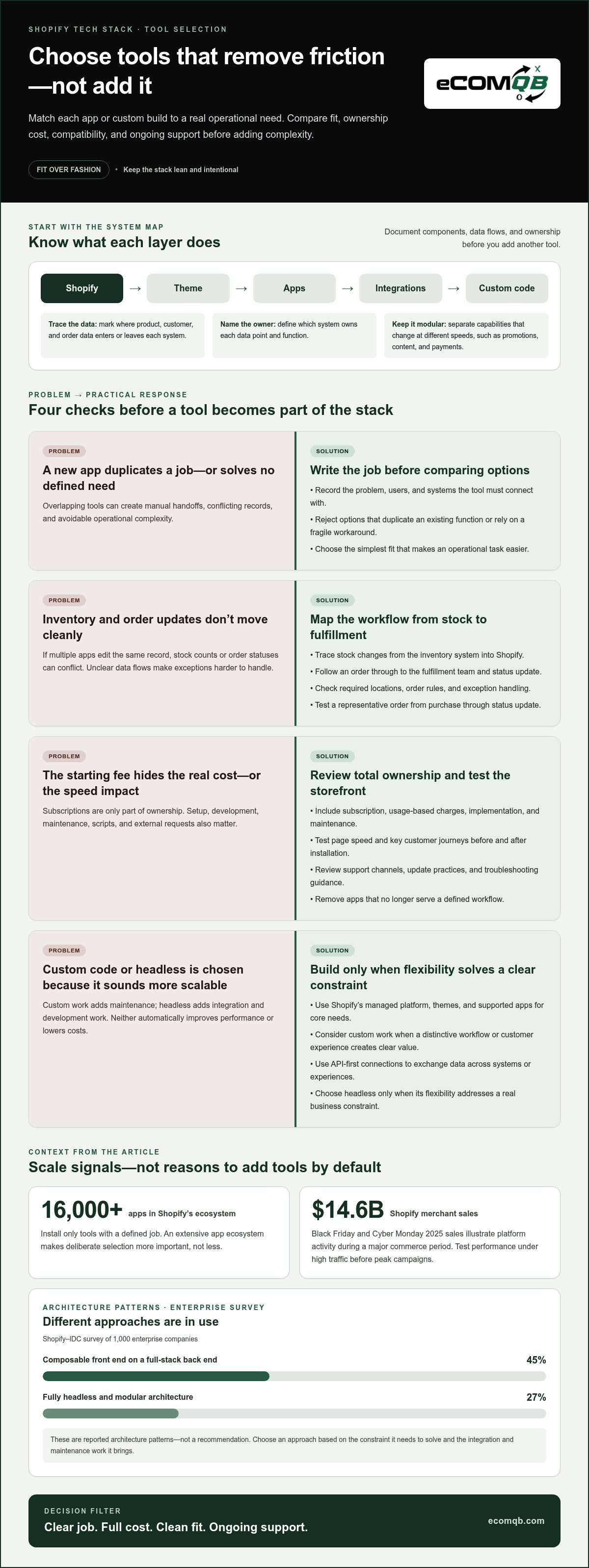
- Map how Shopify, apps, integrations, and custom code work together before adding another tool or building a new feature.
- Compare each option by total cost, operational complexity, compatibility, and support, then choose the simplest fit for the problem.
- Use clear operational and growth signals to assess whether Shopify Plus addresses a real constraint or adds complexity you don’t yet need.
Shopify Scalability: How Do Ecommerce Platforms Enable Growth?
Start with Shopify’s managed commerce platform, then scale infrastructure, storefront performance, and team workflows in response to real demand. To improve speed, choose a lightweight theme, simplify scripts, and test key pages on mobile and desktop under high traffic.
-
Compare Custom and Off-the-Shelf Platforms
Map each business requirement before choosing custom development or an off-the-shelf tool. Shopify’s managed commerce model handles core platform infrastructure, while themes and apps extend the store without requiring you to build every feature. Custom work makes sense when a distinctive workflow or customer experience creates clear value. Avoid custom code for a need that a supported app already addresses, since it adds maintenance and can slow releases.
-
Review Shopify Scale and Upgrade Needs
Track storefront speed, checkout friction, traffic patterns, and the time required to ship improvements. Shopify merchants recorded $14.6 billion in Black Friday and Cyber Monday 2025 sales, demonstrating platform activity during a major commerce period. Test performance under high traffic before peak campaigns. Consider Shopify Plus when your current setup constrains required workflows or growth plans; compare the operational value of an upgrade with its added complexity.
-
Connect Marketing and Commerce Tools
Connect Shopify to ERP, CRM, email marketing, and customer support tools around clear data flows. Use integrations or middleware where systems need to exchange orders, customer records, inventory, or campaign events. Choose email and SMS platforms that support relevant segmentation and lifecycle messaging, then define which system owns each data point. Keep the setup lean: the Shopify app ecosystem contains more than 16,000 apps, so install only tools with a defined job.
What Is a Shopify Tech Stack?
Map the components behind your storefront, from Shopify to every connected service. A clear architecture shows where data moves, who owns each function, and which parts may need to change.
-
Define the Shopify Stack Architecture
Document Shopify, your theme, apps, integrations, and custom code as separate components. Shopify uses Ruby on Rails and Liquid, its templating language, to support platform functions and storefront rendering. Mark where product, customer, and order data enters or leaves each system. For a high-volume migration, inventory data first, map existing URLs and metadata, then plan redirects and test records before launch.
-
Plan a Modular Architecture
Separate capabilities that change at different speeds, such as promotions, content, and payments. A modular or composable architecture lets teams update one component without rebuilding the entire commerce experience. K-Swiss implemented a shared code base across its global online stores, illustrating how shared foundations can support multiple storefronts. Define what remains common and what each market needs to localize, including content and customer-facing journeys.
-
Compare API-First and Headless Approaches
Choose API-first connections when Shopify needs to exchange data with other systems or support multiple experiences. Standard themes keep storefront presentation within Shopify, while a headless setup separates the front end and adds integration and development work. Headless can enable tailored experiences, but it does not automatically improve performance or reduce costs. Results depend on implementation and maintenance. Choose it only when its flexibility solves a clear business constraint.
For storefront architecture that aligns design, integrations, and growth priorities, explore Shopify website design and development as a strategic next step.
Choosing tools by cost, complexity, compatibility, and support
Assess each tool against its operational purpose, total ownership cost, integration fit, and support. For inventory, fulfillment, and order management, prioritize tools that synchronize stock, orders, and status changes. Review recurring fees and storefront performance before installation.
-
Set Tool Selection Criteria
Create a short selection framework before comparing tools. Record the problem, who will use the tool, and which systems it must connect with. Compare ongoing fees, setup and development effort, Shopify compatibility, and the quality of support documentation. Reject options that duplicate an existing function or depend on a fragile workaround. A tool should simplify an operational task, not create another manual handoff.
-
Choose Apps for Store Operations
Match inventory, fulfillment, and order-management apps to your actual workflow. Map how a stock change moves from the inventory system to Shopify, then how an order reaches the fulfillment team. Choose tools that support your required locations, order rules, and exception handling. Test a representative order from purchase through status update. Avoid overlapping apps that edit the same record or create conflicting inventory counts.
-
Review App Fees and Performance Risks
Estimate each app’s full ownership cost, including its subscription, usage-based charges, implementation, and maintenance. Do not judge a tool by its starting fee alone. Test page speed and key customer journeys before and after installation, especially if the app adds scripts or external requests. Review support channels, update practices, and troubleshooting guidance. Remove apps that no longer serve a defined workflow.
Integration choices can also reflect broader architecture patterns: in a Shopify-IDC survey of 1,000 enterprise companies, 45% reported using a composable front end on top of a full-stack back end, and 27% reported running fully headless and modular architectures. Middleware tools such as Zapier or custom APIs can connect CRM, ERP, and marketing platforms. Capgemini Research Institute's 2026 consumer research found that 25% of consumers used generative AI shopping tools during 2025. 3PL providers and automated shipping workflows support fast and accurate order deliveries.
When should a Shopify store upgrade to Shopify Plus?
Upgrade to Shopify Plus when it addresses a specific constraint your current setup cannot solve efficiently. Build the case around operational friction, required capabilities, and the work involved in changing plans.
- Identify the constraint before comparing plans. Record where your current Shopify setup slows launches, complicates operations, or blocks a required workflow. Distinguish recurring friction from a temporary workload spike. An upgrade should solve a persistent business need, not simply signal ambition.
- Match each need to a documented Shopify Plus capability. If a workflow requires functionality your current plan does not provide, compare that requirement directly with Plus. Avoid upgrading based on assumptions about features. Document what would change for your team, customer journey, and daily operations.
- Measure the operational impact of staying on your current plan. Track manual workarounds, handoffs, and delays tied to the existing setup. Then estimate how the proposed Plus capabilities would change those tasks. If an upgrade would not remove a meaningful constraint, improve execution, or support a defined growth initiative, keep evaluating your current setup.
- Assess the full transition, not just the plan change. Review connected apps, integrations, custom code, staff workflows, and storefront behavior. Identify required development or process updates. A Shopify Plus upgrade is a poor fit if it adds complexity without resolving the issue that prompted the review.
- Set decision criteria and a review point. Compare the documented capability, expected operational improvement, implementation effort, and ongoing ownership. Involve the people responsible for Shopify, finance, development, and customer operations. Approve the move when requirements are clear and the business case outweighs the added complexity.
If your storefront needs development alongside a plan review, discuss your Shopify growth requirements.
EComQB: Revenue Generating AI Tools
eComQB helps eCommerce brands connect technology decisions with revenue-focused growth initiatives. Its Revenue Generating AI Tools and AI transformation for eCommerce Brands help teams assess how AI can fit their operating model and customer experience, layered onto proven growth systems.
Turn to eComQB when your Shopify foundations are in place and you’re ready to strengthen acquisition or marketing execution. Agentic Media Buying and Meta Advertising Execution support paid media priorities as part of a broader growth strategy. The right next move depends on your goals, existing workflows, and where your team needs support.
Contact eComQB to discuss your eCommerce growth priorities, or visit ecomqb.com.
Set Your Next Growth Move in Motion
A scalable Shopify tech stack should evolve with your operating priorities, not chase technology trends for their own sake. Treat each change as a focused investment: identify the constraint, define the outcome, and align the work with your growth plan. That discipline keeps your roadmap deliberate as your business changes.
eComQB can connect your Shopify direction with broader eCommerce growth priorities, including AI and paid media. Bring the challenge you’re working through and the outcome you want to pursue. Together, you can shape a practical next step around your business needs.
Contact eComQB about your Shopify stack and move forward with clarity and confidence.
Frequently Asked Questions
Build or buy?
Buy when an existing tool handles the workflow reliably; build when your process creates a genuine competitive difference. For example, use an established returns app for standard returns, but consider custom development if product configuration depends on unique rules. Compare setup effort, ongoing ownership, and how easily each option can change. Avoid building a feature simply to copy a competitor’s interface.
Is a custom platform right for commerce?
A custom platform can suit commerce businesses with requirements that established platforms cannot effectively support. It also makes your team responsible for more of the system’s development, maintenance, and future changes. Before committing, list the business requirements, identify where existing options fall short, and define who will maintain custom components. If your requirements are standard, customization on a managed platform may be simpler.
What is an ecommerce technology stack?
An eCommerce technology stack is the collection of software and services a business uses to sell online and manage related operations. It can include a storefront, commerce platform, payment processing, inventory tools, analytics, and customer communications. For example, a shopper’s order may pass from the storefront to payment processing, then into order management. Mapping that path clarifies where data and responsibilities sit.
What should companies consider before scaling their ecommerce platform?
Start with the business change you need to support, such as entering another market or managing more complex product options. Then assess data quality, internal ownership, integration dependencies, and the affected customer journey. International expansion, for example, may require coordinated updates to localized content, currencies, and support workflows. A rollout plan should assign owners and define how the team will identify problems.
What does a scalable Shopify tech stack include?
A scalable Shopify tech stack combines Shopify with the supporting components required for the store’s actual workflows. The right mix varies: a brand with simple operations may need a theme and a few focused integrations, while a business with specialized processes may need additional development. Prioritize clear data ownership, reliable connections, and tools your team can operate. Leave room to replace components as needs change.
How to scale Shopify payments, checkout, and international sales
Keep payments modular, map their connections with Shopify and other systems, and test checkout journeys under high traffic. For international sales, define what remains common and what each market needs to localize, including customer-facing journeys. Consider Shopify Plus only when it solves a specific, required workflow constraint.