Common Shopify Development Mistakes to Avoid in 2026

A Shopify store rarely loses momentum because of one bad line of code. More often, problems compound: unclear requirements cause rework, extra apps add complexity, and technical shortcuts undermine usability, discoverability, or growth. The common Shopify development mistakes to avoid aren’t just coding errors. They’re decisions that make the whole store harder to use, maintain, measure, or grow.
A store needs to look good and work smoothly, but the harder task is spotting risky decisions before launch and finding the fixes that matter most once the store is live. This checklist explains what to look for, how to prioritize it, and why each decision matters.
We’ll cover planning, theme choices, apps and integrations, performance, analytics, and scalability. You’ll learn to prioritize fixes by customer impact, business risk, and implementation effort, then make more confident decisions about your Shopify store’s design and development. The goal is a storefront that serves customers today and supports what comes next.
Key Takeaways
- Spot the common Shopify development mistakes to avoid by assessing how decisions affect usability, speed, data, and future growth.
- Choose themes, apps, and custom code based on business value and maintenance needs, not convenience alone.
- Connect storefront warning signs to likely root causes, customer impact, and a useful first diagnostic.
- Use a structured pre- and post-launch checklist to test key shopping journeys, analytics, and ongoing store performance.
- Align brand strategy, customer journeys, and technical execution to turn Shopify fixes into a focused growth plan.
Common Shopify Development Mistakes Start Before the First Line of Code
A Shopify build can look polished and still miss the mark. Treating it as a visual task alone can leave customer journeys, business rules, data needs, and future maintenance out of sync. A storefront is part of a connected business system, and decisions made before development affect how well it serves customers and supports growth. For a high-level overview of the Shopify platform and its ecosystem, start with its background, then assess what your store needs to do.
The common Shopify development mistakes to avoid aren’t limited to coding defects. They include decisions that weaken usability, speed, data quality, maintainability, or the ability to scale. Context matters: a missing checkout requirement is a serious launch risk, while a lower-priority content enhancement may be a manageable optimization. Judge each issue by its effect on customers and the business, not by how technically complex it sounds.
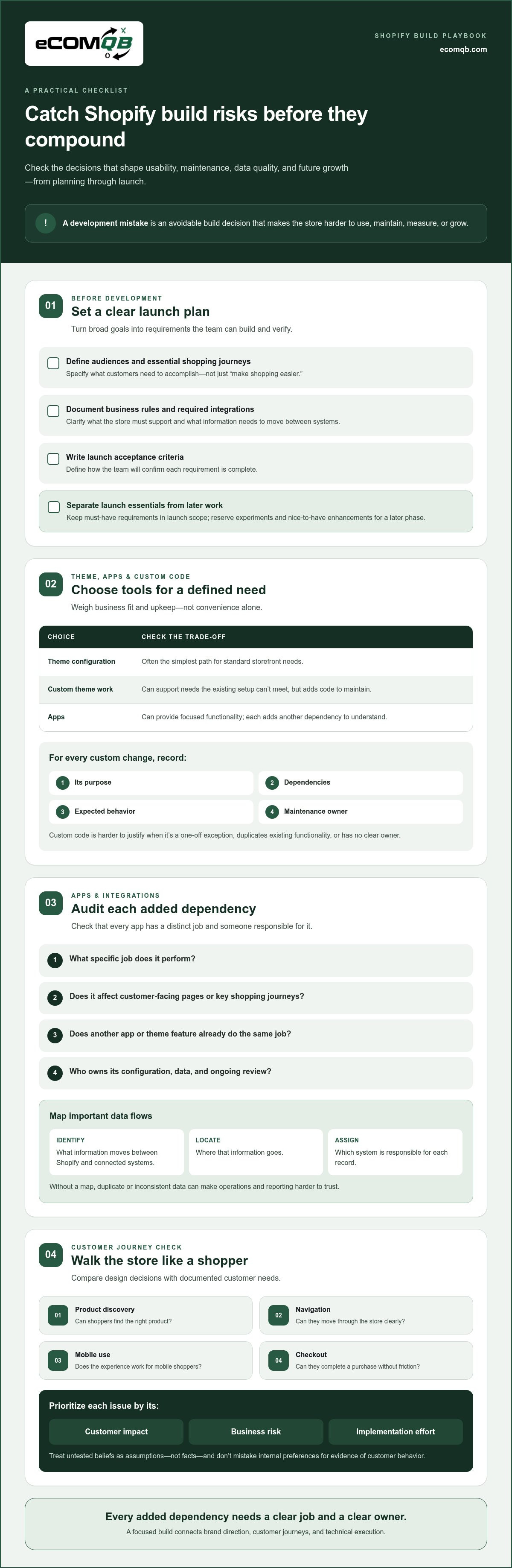
A Shopify development mistake is an avoidable build decision that makes the store harder to use, maintain, measure, or grow. Use this planning checklist to set priorities:
- Define audiences and their essential shopping journeys.
- Document business rules, required integrations, and launch acceptance criteria.
- Separate must-have launch requirements from later tests and enhancements.
Why unclear requirements create expensive Shopify rework
“Make shopping easier” isn’t a build requirement. Without specifics, a team may choose templates that don’t support the catalog, add features that conflict with business rules, or connect systems without defining what data needs to move. The result is mismatched expectations and avoidable rework. Document what customers need to accomplish, what the store must support, and how the team will confirm each requirement is complete.
Prioritize deliberately. Include essential journeys and operational rules in the launch scope. Keep experiments and nice-to-have enhancements for a later phase, where they can be evaluated without putting core functionality at risk.
How to spot a storefront built around assumptions
Walk through product discovery, navigation, mobile use, and checkout as a customer would. Can shoppers find the right product, understand their options, and complete a purchase without friction? Compare each design choice with a documented customer need. Label untested beliefs as assumptions, not facts, and don’t treat internal preferences as proof of customer behavior.
A clear build strategy connects brand direction to customer journeys and technical execution. eComQB brings Shopify design and development together with strategic planning, helping organize those decisions into a coordinated plan instead of separate design and development tracks. That alignment gives the project a stronger starting point and makes technical choices easier to assess.
Shopify Theme, App, and Custom-Code Mistakes That Create Technical Debt
Every implementation choice has a trade-off. Theme configuration is often the simplest path for standard storefront needs. Custom theme work can support requirements the existing setup can’t meet, but it adds code to maintain. Apps can provide focused functionality, yet each one adds another dependency to understand. The common Shopify development mistakes to avoid happen when teams choose tools for convenience without weighing fit, upkeep, and business value.
Use a clear test: does this choice solve a defined customer or operational need, and is its ongoing responsibility understood? Strong ecommerce development best practices also keep usability, mobile experience, and checkout in view, not just feature delivery.
When custom Shopify development is justified, and when it is not
Custom code makes sense when a specific customer journey or operational rule can’t be handled effectively through standard configuration. It’s harder to justify a one-off exception, a feature that duplicates existing functionality, or a customization with no clear owner. These choices can complicate future updates and troubleshooting.
For every custom change, record its purpose, dependencies, expected behavior, and the person or team responsible for maintaining it. Undocumented code turns a straightforward handoff into detective work: the next developer must first work out what the change does before safely modifying it.
How app sprawl and integrations create avoidable risk
An app can seem like a quick fix, but installing one for every small feature may create overlapping tools, extra upkeep, and a more complex storefront. Audit each app against four questions:
- What specific job does it perform?
- Does it affect customer-facing pages or key shopping journeys?
- Does another app or theme feature already do the same job?
- Who owns its configuration, data, and ongoing review?
Map important data flows before adding integrations. Identify what information moves between Shopify and connected business systems, where it goes, and which system is responsible for each record. Without that map, duplicate or inconsistent data can make operations and reporting harder to trust.
Apply the same discipline to personalization. Define the customer need first, then choose an approach that fits it. eComQB offers AI-driven personalization experiences, designed around a clear role in the customer journey rather than added as another layer without a purpose.
Every added dependency should have a clear job and a clear owner. If you’re weighing custom work, apps, or integration priorities, a Shopify development planning call can help turn the trade-offs into a focused plan.
Shopify Performance, SEO, and Conversion Mistakes to Fix First
A slow page, a weak search result, or an abandoned cart is a warning sign, not a diagnosis. The cause could be an oversized image, a script, an app, theme code, configuration, or a confusing customer journey. Don’t assume one factor is always responsible. The common Shopify development mistakes to avoid include treating symptoms in isolation instead of tracing them to a fixable cause.
Use this comparison to choose a first diagnostic, then verify the issue on the affected page type and customer journey.
| Warning sign | Possible causes | Customer impact | First diagnostic |
|---|---|---|---|
| Pages feel slow | Images, scripts, apps, theme code, or configuration | Waiting interrupts browsing and buying | Compare key templates with a performance tool; inspect page assets and scripts |
| Shoppers struggle to find products | Unclear navigation, filters, collection structure, or search | More effort to find a relevant item | Test a real product-finding task on mobile and desktop |
| Customers stall in the purchase journey | Unclear product details, cart friction, or confusing calls to action | Uncertainty can derail a purchase | Walk through product selection and cart actions as a customer |
| Important pages have weak search visibility | Metadata, redirects, canonical handling, crawlability, or thin content | Relevant pages may be harder to discover through search | Review page indexing and search performance data |
How storefront speed and mobile usability mistakes affect shoppers
Test the journey, not just the homepage. On a phone, browse a collection, select product options, add an item to the cart, and check that each action responds clearly. Review loading and interaction performance with suitable tools, then compare results across representative templates. Google’s “good” Core Web Vitals thresholds are LCP at or below 2.5 seconds, INP at or below 200 milliseconds, and CLS at or below 0.1. Treat these as signals, not a substitute for testing real customer tasks.
A fix that improves one page but disrupts another isn’t a win. Recheck affected templates and interactions after every meaningful change.
Which Shopify SEO and conversion issues belong in a development audit
Review whether important pages are crawlable and indexable, metadata can be managed appropriately, redirects preserve useful paths, and canonical handling supports the intended page structure. Then inspect navigation, product information, trust cues, and friction across the shopping journey. For broader organic visibility guidance, explore SEO and Content Strategy for Shopify.
Set a consistent baseline before changing the store. Compare analytics and search-performance data over comparable periods, and record which templates or journeys changed. That makes it easier to distinguish a genuine improvement from a shift in traffic or measurement.
A Shopify Development Checklist for Testing Before and After Launch
A launch isn’t ready just because every page looks finished. Customers need to be able to complete the tasks that matter, tracking needs to work, and the team needs to know how it will spot problems. Use this sequence to catch the common Shopify development mistakes to avoid before they affect real shopping journeys.
- Confirm requirements. Turn launch priorities into testable outcomes. Identify key products, customer paths, business rules, and integrations, then define what “working” means for each.
- Review the build. Check priority templates on mobile and desktop. Confirm layouts adapt, text remains readable, controls are easy to use, and key actions can be completed with a keyboard. Review redirects for important changed or retired URLs.
- Test store functionality. Browse collections, use search, select product options, update the cart, and proceed through checkout. Submit forms and test customer account paths that apply to your store. Check that integrations handle expected data and that failures or missing responses are visible to the team.
- Validate analytics. Confirm key events are recorded once, with useful information, across important steps in the customer journey. Check reporting against a known test path so missing or duplicated events don’t distort the baseline.
- Control the launch. Assign owners for final checks, confirm priority fixes are resolved, and verify critical customer paths on the live storefront. Keep a record of launch conditions and any issues being monitored.
- Monitor and refine. Compare analytics, search visibility, store errors, and customer feedback with pre-launch baselines. Schedule a post-launch review to catch issues that emerge under real usage.
What to test across devices, browsers, and customer journeys
Test representative mobile and desktop environments, including the browsers your customers use. Follow complete paths, not isolated screens: navigate to a product, choose options, add it to the cart, submit a form, and continue through checkout or account access. Confirm navigation, cart updates, and integrations behave as intended. Log each issue with its severity, reproduction steps, owner, and resolution status.
Launch readiness means testing complete customer journeys, not just isolated pages. A working product page means little if the cart action fails or the next step confuses shoppers.
How to monitor a Shopify store after launch
Use the same analytics and search-performance views you recorded before launch, and compare like with like. Review error reports and customer feedback alongside the numbers. Prioritize issues by customer impact, business importance, and risk, not visual preference. A broken purchase path takes precedence over a minor spacing adjustment.
Use a Shopify development review call to prioritize store fixes or structure testing for a new build.
How eComQB Helps Turn Shopify Development Fixes Into a Growth Plan
A store audit is useful only when it leads to the right next move. A list of issues can reveal friction, but the fixes need to support a clear business direction. Align brand strategy, customer journeys, and technical implementation so each decision improves the storefront for shoppers and the business.
eComQB brings Shopify design and development together with strategic planning. We connect what the brand needs to communicate with what customers need to do, then translate those priorities into a practical technical plan. The result isn’t automatically a full rebuild. It’s a roadmap that separates urgent fixes from larger opportunities and sequences work around impact, dependencies, and effort.
When to optimize an existing Shopify store versus plan a new build
Start with evidence. If a specific template, integration, or shopping step is causing friction, targeted improvements may address the problem while preserving effective workflows and content. A new build becomes a strategic option when verified requirements expose broader structural limits that prevent the store from supporting important customer journeys or business needs.
Compare the scope and dependencies of each path. Fix isolated defects without treating them as proof that the whole store must be replaced. A rebuild should solve defined requirements, not serve as the default response to a frustrating issue.
What a focused Shopify development conversation should accomplish
Bring your business goals, known store pain points, integrations, and priority customer journeys. These details help turn broad concerns into clear questions: Which friction points matter most? What should be preserved? Which fixes depend on other work? What should be measured after implementation?
From there, eComQB connects Shopify strategy, design, and technical execution in a phased plan. The common Shopify development mistakes to avoid become easier to address when decisions are tied to customer impact and business priorities, not isolated technical tasks.
Ready to prioritize fixes or map out a new build? Book a Shopify development strategy call to discuss your store’s goals, challenges, and next steps.
Build a Shopify Store Ready for What Comes Next
The common Shopify development mistakes to avoid often begin with unclear requirements, unnecessary complexity, or fixes made without understanding their impact. A stronger approach connects business goals to customer journeys, chooses themes, apps, and custom code with care, then tests the complete storefront experience before and after launch.
Prioritize issues by customer impact and business risk, not by which change looks easiest. Some stores need focused improvements; others have structural constraints that call for a broader plan. Either way, decisions are sharper when strategy, design, and technical execution work together.
eComQB provides Shopify website design and development grounded in brand strategy and technical execution, alongside eCommerce growth marketing. Book a Shopify development strategy call to discuss your store’s priorities and map a practical next step.
Frequently Asked Questions
What are the most common Shopify development mistakes to avoid?
The most common Shopify development mistakes to avoid include unclear requirements, unnecessary apps or custom code, weak mobile usability, overlooked technical SEO, and incomplete launch testing. These risks can compound: an integration may disrupt data while an untested product template creates friction for shoppers. Start by ranking issues by customer impact and business risk. Then investigate the likely cause before choosing a fix, so you address the underlying problem rather than just its symptom.
Can too many Shopify apps slow down a store?
Yes, apps can contribute to slower pages or more complex storefront behavior, but the effect depends on the app, its configuration, the theme, and the pages it touches. An app may add scripts, overlap with existing features, or introduce dependencies. Audit each app’s purpose, use, customer impact, and owner. Test page performance before and after any change, since removing an app won’t automatically resolve every speed issue.
How do I know if my Shopify store needs a redesign or development fixes?
Start by identifying the problem, how widely it appears, and which customer journeys it affects. If one template, integration, or interaction is failing, a targeted development fix may be enough. If changed requirements affect the store broadly, or its structure repeatedly blocks essential workflows, consider a wider redesign or rebuild. Base the decision on documented needs and evidence, not visual preference alone. Preserve effective content and workflows where they still serve customers.
Does custom code hurt Shopify SEO?
Custom code doesn’t automatically harm SEO. Problems can arise if an implementation creates crawlability issues, missing or duplicate page signals, poor performance, or content structures that are difficult to maintain. Review rendered pages, technical settings, and search data before linking a ranking change to code. Check Shopify-specific behavior against current platform documentation, and test important changes on relevant templates before applying them broadly.
What should I test before launching a Shopify store?
Test complete customer journeys, not just whether the homepage loads. Check navigation, product options, cart actions, forms, key integrations, mobile layouts, analytics events, redirects, and important page templates. Confirm essential content and store settings are ready, then record issues with an owner and retest each fix. Tailor the checklist to the store’s products, markets, and workflows. A complete path from product discovery through checkout can expose issues a page-by-page review misses.
Can common Shopify development mistakes be fixed without rebuilding the store?
Yes, many issues can be resolved with focused changes to theme configuration, content, app setup, integrations, tracking, or specific customer journeys. Start with an audit that identifies root causes and dependencies, then prioritize changes by customer impact and business risk. A rebuild may be appropriate if the current structure can’t meet essential requirements efficiently. An isolated defect, on its own, isn’t proof that the entire store needs replacing.
How should I prioritize Shopify development fixes?
Rank each issue by customer impact, business risk, affected journey, and effort. Fix blockers that prevent shoppers from finding products or completing key actions before lower-impact visual refinements. Record the suspected cause and establish a consistent baseline before making changes. Then measure the outcome against that baseline. This keeps the work focused and helps distinguish a real improvement from a change that looks different but doesn’t make the store easier to use.