
A Shopify storefront isn’t just a visual refresh. It’s part of how customers discover products, understand their options, and decide whether to buy. Strong shopify website design and development brings strategy, customer experience, and technical execution together, so design decisions support the way people actually shop. A new look may attract attention, but it won’t fix confusing navigation, incomplete product information, or unclear project scope on its own.
If you’re weighing theme customization against custom development, or deciding what your project should include, start with the store’s needs rather than a list of features. This guide explains how strategy, design, and development work together, how to choose a build approach, and what to prepare before launch. The aim is to make deliberate choices that improve the customer experience without adding complexity for its own sake. eComQB combines eCommerce brand strategy with Shopify design and development to create storefronts and agentic landing pages around customer journeys and business priorities.
Key Takeaways
- Assess the customer journey before prioritizing visual changes, so your storefront plan addresses specific friction.
- Use a clear project sequence to turn business goals and customer needs into requirements the team can act on.
- Compare theme customization and custom development against your requirements, flexibility needs, and ongoing complexity.
- Prepare content, assets, decision owners, and quality checks before launch to keep the project focused.
- Use shopify website design and development to connect brand strategy and technical execution across storefronts and landing pages.
Why Shopify Website Design and Development Must Start With the Growth Problem
A storefront can look polished and still make shopping harder than it needs to be. Shoppers may struggle to find the right product, understand its value, or move confidently toward checkout. A visual refresh changes how the site looks. A growth-focused project first identifies where the customer journey breaks down, then shapes the work around that problem.
A growth-focused Shopify storefront connects clear customer journeys, consistent brand expression, and technical implementation to the store’s business priorities. Set that standard before debating colors, layouts, or code. Shopify provides the commerce platform, but a useful storefront starts with understanding who will use it, what they need to know, and what decisions they need to make.
What a Shopify design and development project covers
Shopify website design and development brings strategy, user experience, visual design, and implementation together. Strategy defines business priorities and customer needs. For teams developing their foundational communication strategy, firms like eq4digital.com highlight the value of combining emotional intelligence with intentional brand positioning. Experience planning turns those inputs into a structure shoppers can follow. Visual design expresses the brand within that structure, and development builds the approved experience in Shopify. Treating these as connected workstreams helps keep the design tied to the store’s actual requirements.
Each page type has a distinct job. A collection page helps shoppers browse and compare related products. A product page gives them the information needed to evaluate a specific item. A landing page focuses attention on a particular audience, offer, or campaign journey. Plan each page around its purpose, rather than repeating the same layout and content everywhere.
Keep the project scope clear, too. Storefront work covers the site experience, including its structure, content presentation, design, and implementation. Advertising, email and SMS campaigns, and operational decisions can affect the broader customer experience, but they are separate workstreams. For broader context on the platform itself, see Shopify's history and platform overview.
When a store needs more than a theme refresh
A theme refresh may fit when the core shopping journey works and the main need is a more current or consistent visual expression. Look deeper when shoppers have trouble with navigation, product information is difficult to scan, branding changes from page to page, or the promise that brings someone to the site doesn’t match what they find there. These are experience issues, not just styling problems.
Before committing to a redesign, connect symptoms to evidence. Identify the business priority, such as making product discovery clearer, then review customer feedback, support questions, and observed behavior across key journeys. If shoppers can’t tell which product fits their needs, changing the color palette won’t resolve that decision barrier. If the issue sits outside the storefront, such as limited awareness or an operational constraint, a redesign alone may not address it.
Use the diagnosis to define the smallest scope that can make a meaningful difference. A focused visual update, revised page structure, or broader storefront improvement may each be appropriate. The goal isn’t to redesign by default. It’s to put strategy, design, and development behind the problem that matters most.
How Shopify Website Design and Development Moves From Strategy to Storefront
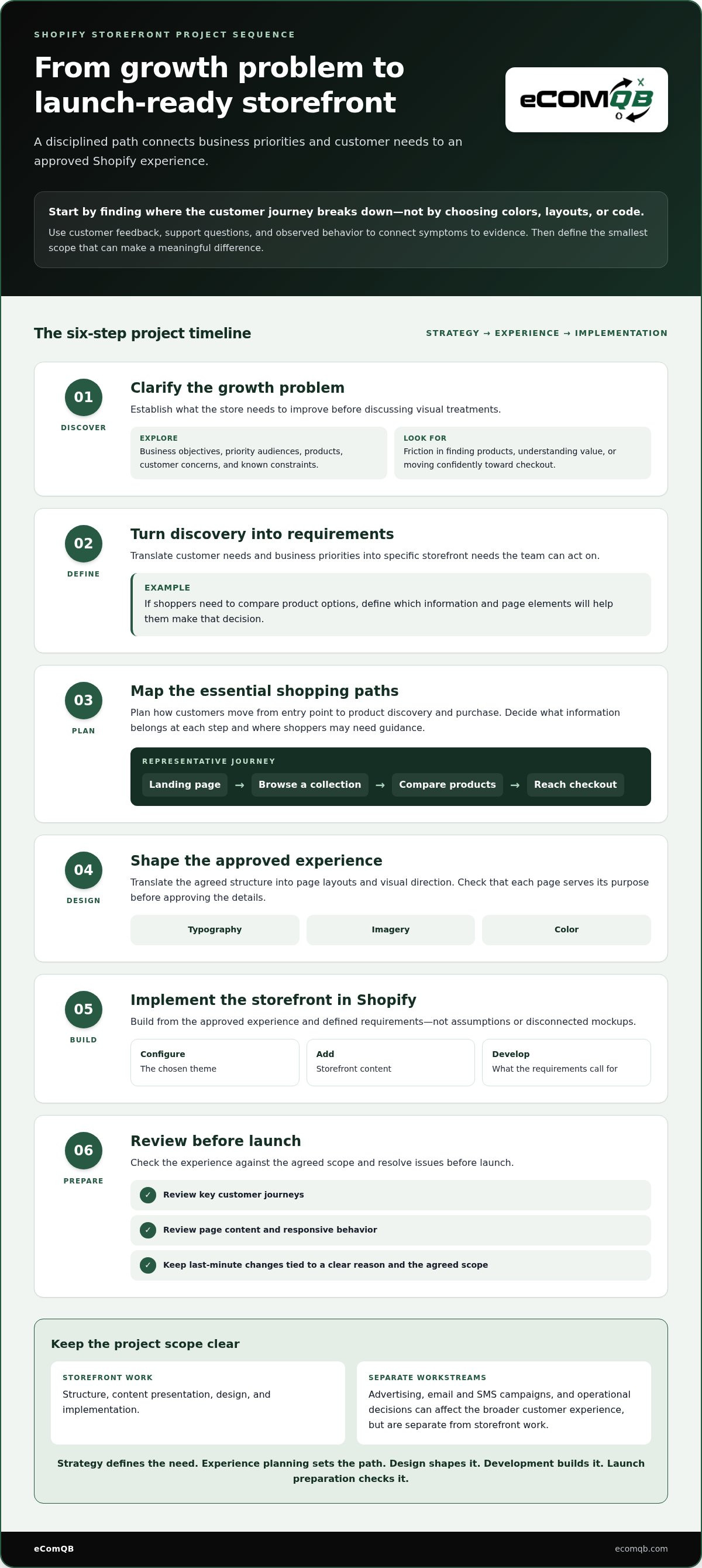
A disciplined Shopify project moves from business questions to customer journeys, then from an approved experience to implementation. This sequence gives each decision a purpose and makes the handoff between strategy, design, and development clearer. The team can build from agreed requirements rather than assumptions or disconnected mockups.
Define requirements before design and development. They establish what the storefront must help customers do and what the business needs it to support.
- Discovery: Clarify business objectives, priority audiences, products, customer concerns, and known constraints. Identify what the store needs to improve before discussing visual treatments.
- Requirements: Turn discovery into specific needs. If shoppers need to compare product options, for example, define which information and page elements will help them make that decision.
- Experience planning: Map essential paths from entry point to product discovery and purchase. Decide what information belongs at each step and where shoppers may need guidance.
- Design: Translate the agreed structure into page layouts and visual direction. Review whether the experience serves its purpose before approving details such as typography, imagery, and color.
- Development: Implement the approved storefront in Shopify, configure the chosen theme, add content, and develop what is needed to meet the defined requirements.
- Launch preparation: Review key journeys, page content, and responsive behavior. Resolve issues against the agreed scope rather than adding last-minute changes without a clear reason.
Turn business objectives into storefront requirements
Start with the people and tasks that matter most. Document priority audiences, product groups, common customer questions, and the actions shoppers need to complete. Then map representative journeys, such as arriving on a landing page, browsing a collection, comparing products, and reaching checkout. Connect each requirement to a customer need or operational constraint so the team can distinguish essential scope from optional polish.
For discoverability requirements, consider how page structure and content help customers find and understand products. eComQB’s SEO and content strategy for Shopify connects content planning with the storefront. Broader guidance on website development and maintenance principles also highlights that content and upkeep are part of a site’s ongoing needs.
Translate the approved experience into Shopify
An approved design guides implementation, but it isn’t a finished storefront. Theme configuration establishes the chosen design in Shopify. Content entry places approved copy and product information on the planned pages. Development addresses requirements that configuration alone can’t meet. Keeping these activities distinct makes it easier to identify missing content, unresolved design decisions, and requirements that need technical work.
Consider app decisions during planning. An app may support a defined customer or business need, but each addition can affect the storefront experience and the work needed to maintain it. Evaluate apps against specific requirements instead of treating them as default features. For a strategy-led handoff from brand priorities to technical execution, discuss your Shopify storefront project with eComQB.
Shopify Theme Customization vs. Custom Development: How to Compare the Options
Choosing between theme customization and custom development isn’t a contest where the more complex build automatically wins. The right choice depends on what the storefront needs to do, how distinct the customer journey is, and what the business can support over time. Write down the requirements first, then match the implementation to them.
Match implementation depth to differentiated requirements, not to the assumption that custom work is always better.
| Decision factor | Theme customization | Custom development |
|---|---|---|
| Fit | Strong fit when the theme’s structure and available settings support the required pages and journeys. | Consider when a specific requirement isn’t addressed by the theme-led approach. |
| Flexibility | Works within the theme’s design and configuration options, shaped by styling and content hierarchy. | Can address more distinctive requirements, with scope defined around the intended experience. |
| Implementation effort | Often involves configuring the theme and adapting content and brand expression to its structure. | Requires additional planning and implementation for requirements beyond configuration. |
| Ongoing complexity | Can keep the storefront approach more focused when the theme meets the brief. | May add complexity to understand and maintain, so the need should justify the extra depth. |
When theme customization may fit the brief
A theme-led approach can work when the theme’s structure supports the store’s page types and customer tasks. Brand styling, a clear content hierarchy, and purposeful page layouts can create a coherent experience without expanding the build unnecessarily. Keep the requirements focused: identify what the theme can support, then customize the parts shoppers need to notice, understand, and act on. For small businesses seeking practical execution within a reasonable budget, teams like Go Mylo Web Design demonstrate how focused website design can establish a polished storefront without unnecessary development overhead.
Before adding apps or custom work, assess Shopify’s platform and theme options against each requirement. If the available approach addresses the need, another layer may increase complexity without improving the experience. Base the decision on the brief, not the novelty of a feature.
When custom development may be justified
Custom development is worth considering when a distinctive customer journey or business requirement can’t be met well through theme configuration. A store might, for example, need a specific way to guide different audiences through product choices. Define that experience first, then weigh the flexibility against implementation and ongoing maintenance needs. A unique requirement deserves a clear rationale, not custom code for its own sake.
If personalization is part of the scope, eComQB’s AI personalization for Shopify offers context for connecting tailored experiences with storefront planning. If it isn’t a requirement, keep the comparison focused on the actual customer journey. Sound shopify website design and development aligns the technical approach with the experience the business needs to deliver.
Plan a Shopify Storefront Project With This Pre-Launch Checklist
A clear brief and disciplined quality checks help keep a storefront project focused from kickoff to launch. For shopify website design and development, preparation means more than collecting visual references. Align business goals, customer needs, content, and decision owners before the team has to fill gaps under deadline pressure.
Use this sequence to prepare the work, validate the experience, and separate launch readiness from improvements that can follow.
Prepare a clear project brief
Document what the storefront needs to support. Name the business goals, priority audiences, required page types, and customer pain points the project should address. Gather source material for the build and assign owners for feedback, approvals, and content decisions. Clear decision ownership helps prevent conflicting direction and stalled reviews.
- Define the brief: Record business priorities, audiences, products, required page types, and known customer questions or friction points.
- Gather project inputs: Collect brand guidelines, approved product information, imagery, and relevant operational requirements. Flag missing or pending materials before they become last-minute placeholders.
- Assign decision owners: Identify who provides feedback, who approves design and content, and who makes the final call when priorities conflict.
- Map the customer journeys: Outline the key paths shoppers need to complete, from their entry point through product discovery and checkout. Use these paths to guide design reviews and launch testing.
Keep the brief useful, not bloated. Each requirement should explain what the storefront needs to support and why. That gives the team a practical reference when scope decisions arise.
Validate the storefront before launch
Before launch, test the planned journeys on desktop and mobile screen sizes. Don’t stop at checking whether pages load. Confirm that shoppers can use navigation, understand product information, complete forms, and progress through checkout without confusing steps or missing content.
- Responsive behavior: Review page layouts and content across screen sizes. Check that important information and actions remain clear and usable.
- Navigation and discovery: Follow the paths shoppers are expected to take. Look for unclear labels, dead ends, or difficulty moving from a category to a relevant product.
- Product information: Review details for accuracy, completeness, and readability. Confirm that the content answers the questions customers need to make a decision.
- Checkout progression: Test the intended purchase journey and note any points where instructions, information, or next actions are unclear.
- Measurement and search: Include analytics requirements and discoverability considerations in the launch plan. Decide what to measure and ensure the relevant content and page structure are ready.
Launch checks establish readiness, not perfection. Once the storefront is live, observe customer behavior and use that evidence to prioritize improvements. A broader eCommerce AI growth system can place storefront decisions within a wider growth roadmap, connecting site experience with other customer touchpoints.
Use your brief to clarify the goals, customer journey, and scope for the build. Plan your Shopify storefront project with eComQB, connecting brand strategy with technical execution.
Build Your Shopify Storefront With eComQB’s Strategy-Led Execution
A Shopify storefront should express the brand clearly and help customers take the next step. That requires more than visual polish. eComQB combines eCommerce brand strategy with Shopify website design and development, aligning the decisions behind the experience with the work needed to bring it to life. The project is guided by customer needs and business priorities rather than design choices made in isolation.
That’s the foundation of eComQB’s shopify website design and development: connecting the brand, customer journey, and storefront implementation. A high-converting storefront is an objective that shapes the work, not a guaranteed outcome. The scope should reflect what your brand needs, where customers encounter friction, and which improvements matter most.
What an integrated eComQB engagement brings together
Brand strategy clarifies how the business should show up and what the storefront needs to communicate. Experience and visual design translate those priorities into a coherent customer journey. Technical implementation brings the approved direction into the Shopify storefront. Each workstream informs the next, so the finished experience follows the brief rather than becoming a disconnected set of pages.
Scope follows the requirements. The work may involve refining storefront pages, developing a more distinctive experience, or aligning an agentic landing page with the main store’s brand and customer journey. Start with a practical question: what does the customer need to understand or do at this point? Then shape the design and implementation around the answer.
Agentic landing pages and storefronts can contribute to a unified experience when their messages, visual direction, and next steps connect. A landing page should carry customers into the store journey naturally, not create a separate brand experience. Storefront work can also sit within a broader growth system, alongside other customer touchpoints, while keeping site design distinct from advertising and AI transformation work.
Set the next move for your Shopify storefront
Bring three things to the discussion: your current storefront, the business goals behind the project, and the customer experience challenge you most want to address. This gives the conversation a clear starting point and helps focus it on strategic needs, priorities, and an appropriate project scope.
From there, turn those priorities into a practical plan. eComQB brings strategic and technical thinking together to shape Shopify storefronts around the experience your customers need. If you’re ready to define that plan, book a strategy call with eComQB.
Make Your Next Storefront Move Count
Your next step isn’t to commission a redesign on instinct. Choose one customer experience priority, define what improvement should look like, and use it to guide the scope. That gives your shopify website design and development project a clear direction, grounded in business priorities rather than visual trends.
Bring your current storefront and the challenge you most want to solve to a strategy conversation. Identify the right next move, then shape a project plan around it. Book a strategy call with eComQB to map a focused direction for your store.
Frequently Asked Questions
How long does Shopify website design and development take?
Timing depends on the project’s scope, requirements, content readiness, and decision process. A theme-led project may differ from one that calls for more distinctive design and development. For a realistic plan, list the required page types, integrations, content owners, and approval milestones. Set review dates with decision-makers early, and flag missing product details or imagery before they affect the schedule.
Can I redesign my Shopify website without changing platforms?
Yes. You can redesign a storefront while keeping it on Shopify. Separate the problems you want to solve from the question of whether to migrate. If shoppers struggle to understand product options, for example, assess the relevant page content and structure first. Then determine whether design changes, theme configuration, or additional development can address the issue on your current platform.
What should I prepare before a Shopify website design project?
Prepare a focused project brief with business goals, priority audiences, brand guidelines, product information, imagery, and known customer or operational challenges. List the required page types and the journeys shoppers need to complete, such as moving from a category to a product and then to checkout. Name the people responsible for feedback and approvals. If you have analytics or customer feedback, gather the insights most relevant to the project.
Is Shopify theme customization enough for a growing brand?
It can be enough if the theme supports the customer journeys and storefront requirements the brand needs. Growth alone doesn’t make custom development necessary. If product pages need a clearer content hierarchy but the shopping flow fits the theme, focused customization may address the brief. Compare the required experience with the theme’s capabilities, then account for the additional implementation and maintenance complexity of custom work.
Does Shopify website development include SEO?
SEO can inform website planning and implementation, but it’s a distinct discipline from development. Page organization and product content can support discoverability while making the store easier to understand. Define those needs early so they’re considered during the build. A new design alone doesn’t guarantee better rankings. Organic visibility also calls for a dedicated SEO and content strategy alongside the storefront project.
How do I know whether my Shopify store needs a redesign or development work?
Start by identifying what customers experience, then match the work to the cause. If pages feel visually inconsistent or important information is hard to scan, design may be central. If the required journey or functionality is constrained, development could be part of the solution. Compare customer feedback and available site analytics with your business requirements, then scope the changes that address the problem.
What should be tested before a Shopify store launches?
Test representative shopping journeys on desktop and mobile, from navigation to a product through checkout progression. Check that product details are accurate, forms behave as intended, and page content remains clear at different screen sizes. Verify that analytics and search requirements are accounted for in the launch plan. After launch, observe customer behavior to identify issues pre-launch testing could not reveal and prioritize subsequent improvements.